For Indian co-operative housing societies

Every bill, payment and approval of your society, in one place.

The office raises the bills, matches the bank and prints the audit pack on the web. The committee approves spending from their phones, between two meetings. Your members just pay.

A month free, every feature. Then ₹10 a flat a month, the same for every society.

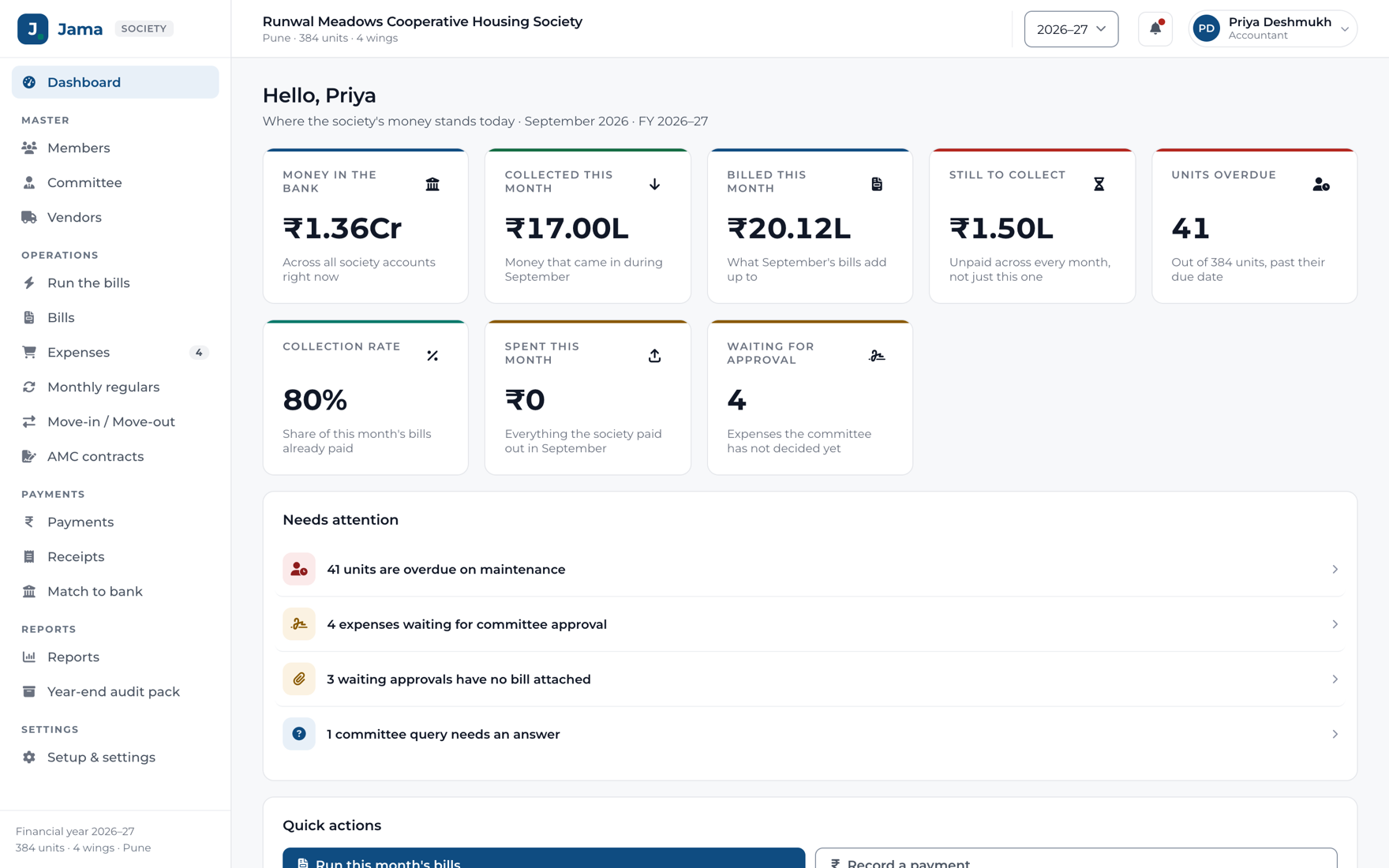
The Jama dashboard with the society’s money position and what needs attention
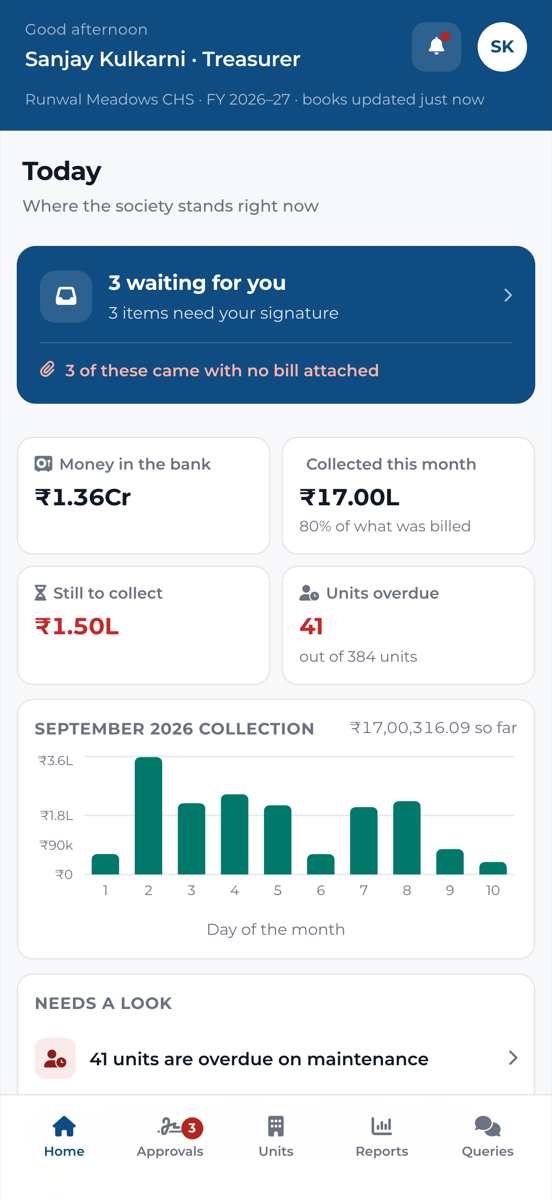
The Jama committee app home screen
Bills for every unit in one eveningBank statement matched automaticallyApprovals from the committee’s phonesReceipts in English and MarathiAn audit pack that tiesLive between the office and the committeeNothing to install from a store
19reports, ready to export
10receipt templates
14settings screens
3year-end statements that tie

Is it for you

If your society still runs on a spreadsheet and a WhatsApp group, yes.

Jama is for a registered co-operative housing society with anywhere from forty to a thousand units. Two kinds of people use it. Your members never have to: they get their bill by email, open the link and pay.

The office

The accountant or the Admin, on a laptop. The whole month happens here.

  • Raise every unit’s bill from the charges your general body approved
  • Record what comes in and match the bank statement
  • File what the society spends and send it for approval
  • Print the reports and the year-end audit pack

The committee

Chairman, Secretary, Treasurer and members. Volunteers with day jobs, on their phones.

  • See what is waiting for their signature the moment they open the app
  • Approve, reject with a note, or ask the office a question
  • Look up any unit: who lives there and what it owes
  • Where the society’s money stands, in four figures

The everyday work

Raising the bills, without the spreadsheet.

Jama works out what every unit owes from the charges your general body approved, and shows you all of it before a single bill goes anywhere.

The Jama dashboard with the society’s money position and what needs attention

The dashboard

Where the society stands, on one screen, before anybody has opened a report.

  • Money in the bank, collected this month, still to collect, units overdue
  • “Needs attention” names what is waiting, and opens straight to it
  • Collection day by day, and where the money came from
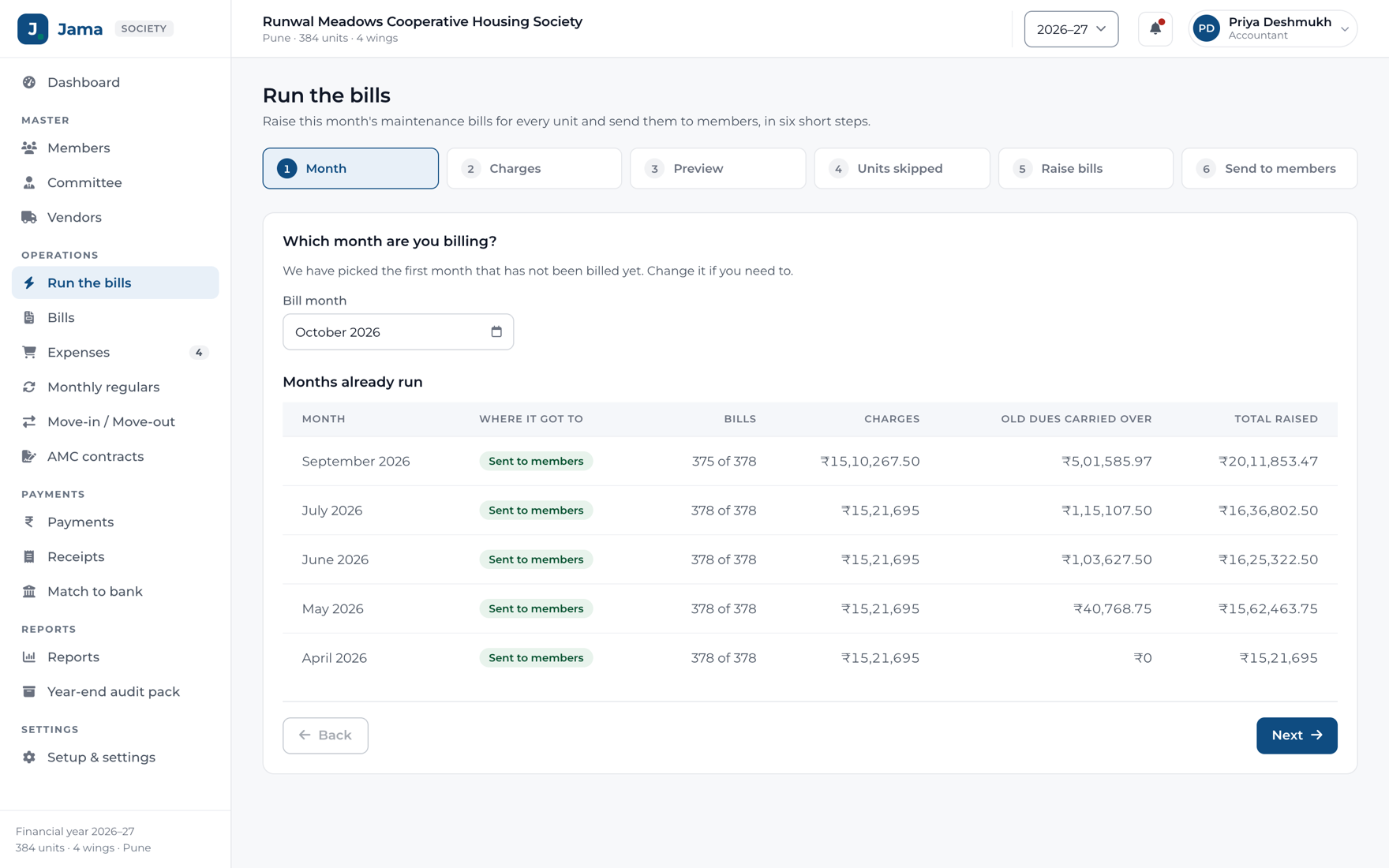
The Jama bill run, from choosing the month to sending the bills

The bill run

Six steps, and an evening. Preview, check, raise, send. Nothing happens until you say so.

  • A preview of the whole run before a single bill exists
  • Arrears carried forward from every unpaid earlier bill
  • Units that cannot be billed cleanly are held back and named, with the reason
  • Monthly or quarterly, by hand or on its own on the day you choose
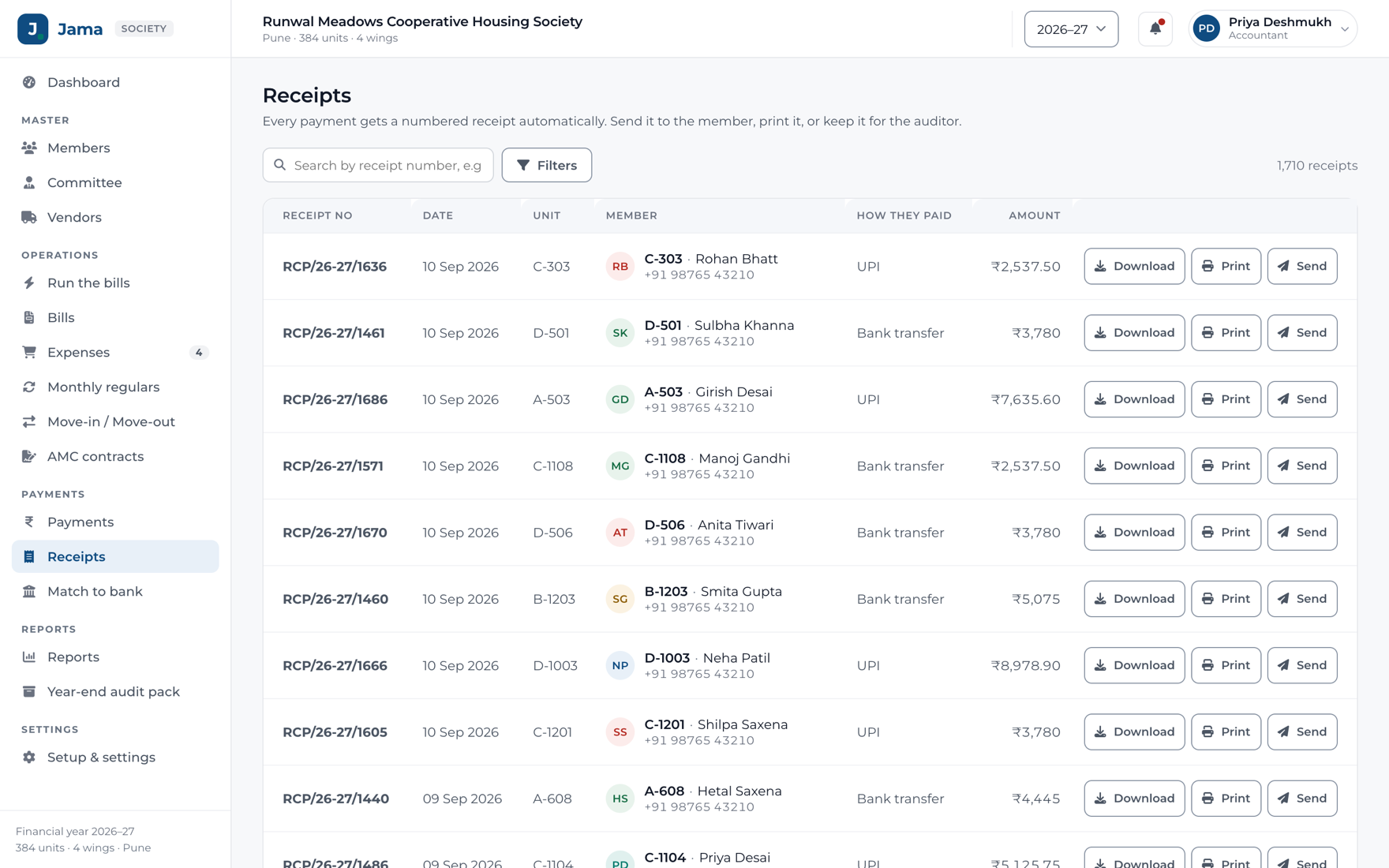
Numbered receipts in Jama, ready to download or email

Receipts

Numbered within the financial year, never duplicated even when two people work at once, and emailed as they are issued.

  • Ten templates: classic, modern, minimal, formal, letterhead and more
  • Bilingual English and Marathi, if that is what your members read
  • Up to four signatories, your logo and your rubber stamp
  • Downloadable as a PDF any time after

Money coming in

Knowing who has paid, and who has not.

The hard part of a society’s month isn’t raising the bills. It’s working out which of the forty credits in the bank statement belongs to which member.

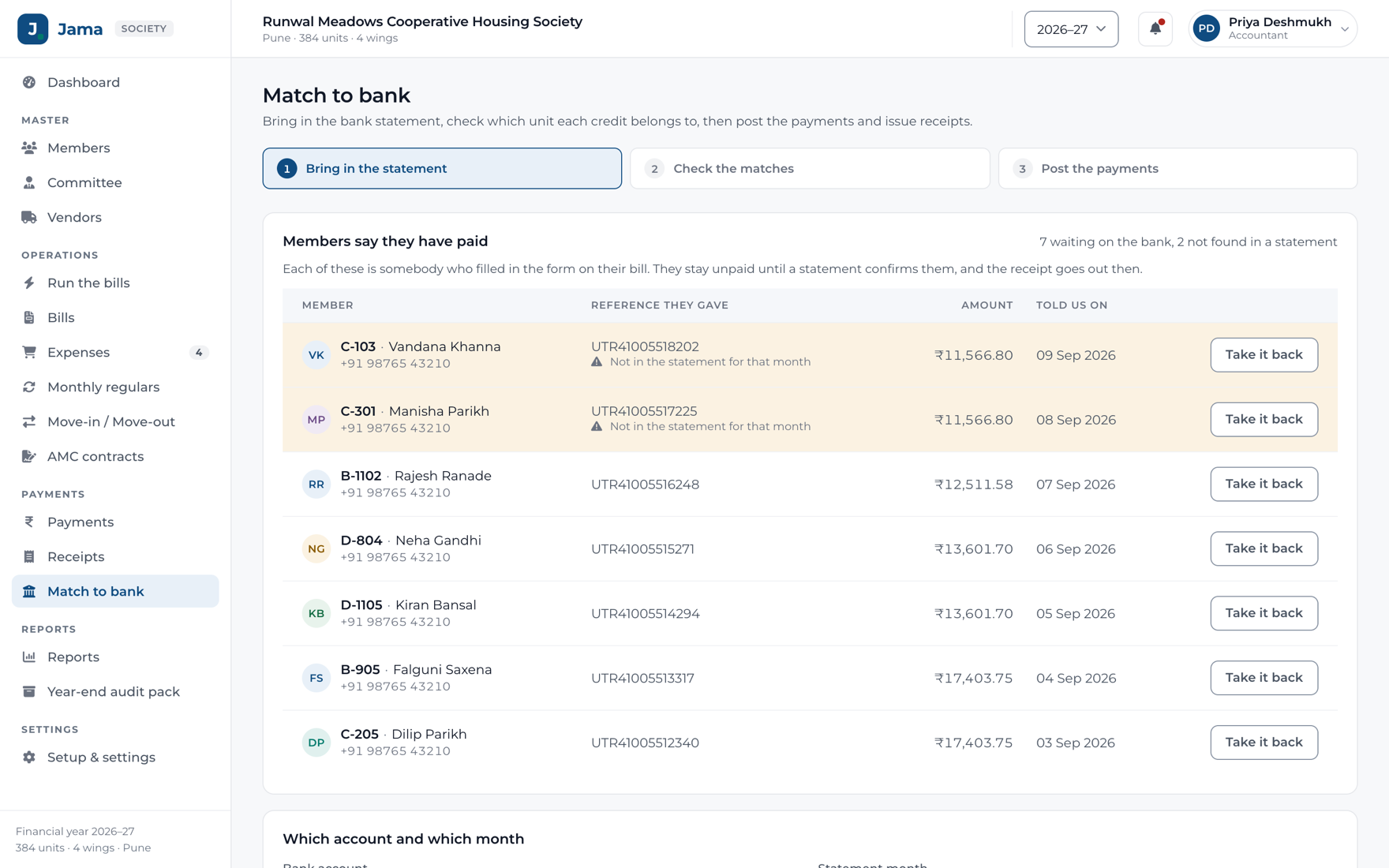
Matching a bank statement to members in Jama

Matching the bank

Automatic

Upload the statement. Jama does the reading, and you confirm.

  • Upload the statement PDF from net banking, matched against what members told you they paid
  • Each credit matched to a member and a bill, with how sure Jama is
  • Members who said they paid are listed until the bank agrees
  • Post a matched batch and the receipts are issued in the same step
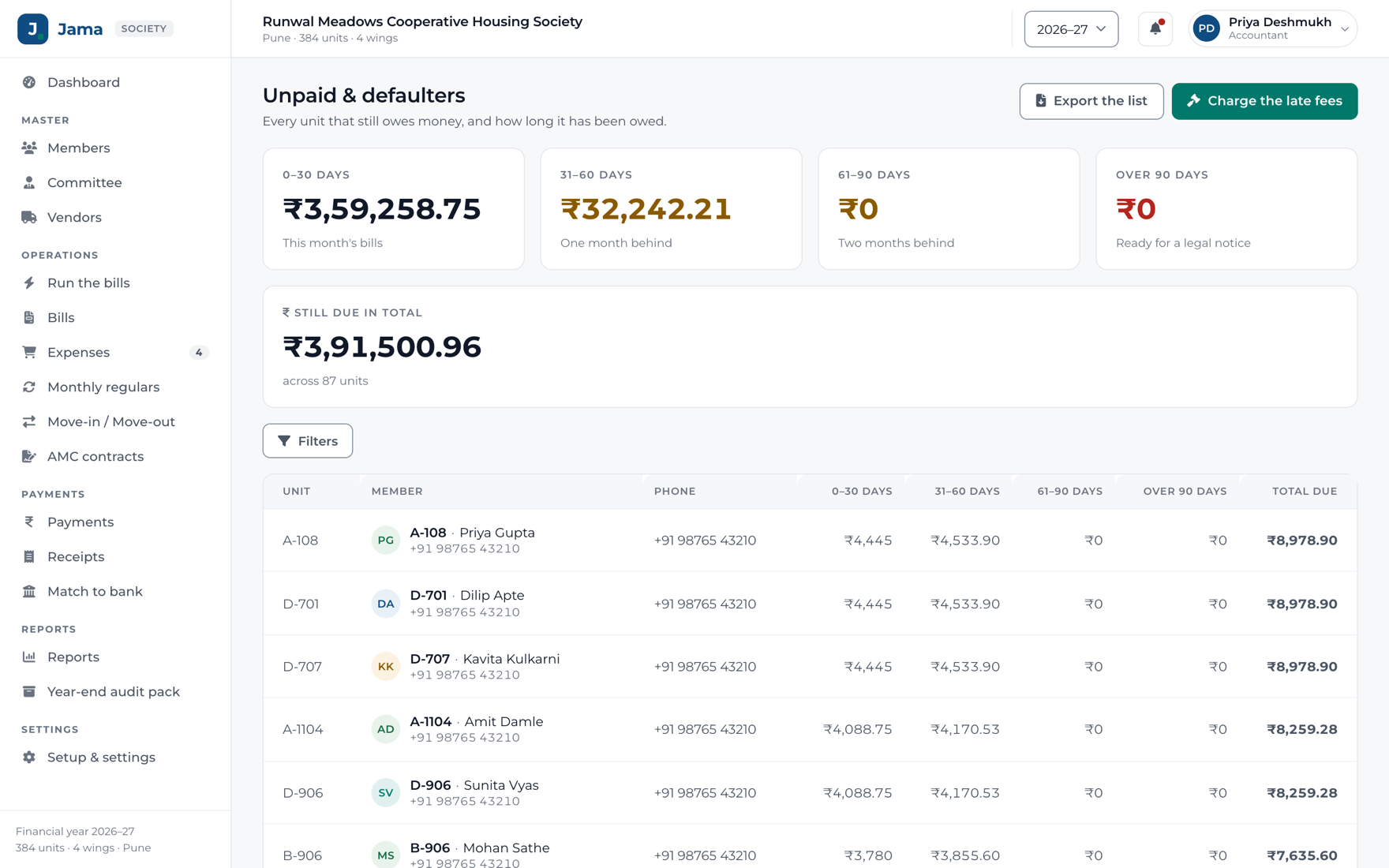
The Jama defaulters list, showing units in arrears and for how long

Chasing what is late

One list, oldest debt first, with what each unit owes and how far behind it is.

  • Outstanding by age: not yet due, 30, 60, 90 days, older
  • Late fees on your own rules: a fixed sum, a percentage, or per day
  • A grace period first, and the day of the month it is charged on
  • Waive a fee, with the reason and the sign-off recorded

Money going out

Spending that somebody has actually signed for.

Your society already has rules about who may approve what. Jama enforces the rules you wrote, instead of asking you to adopt somebody else’s.

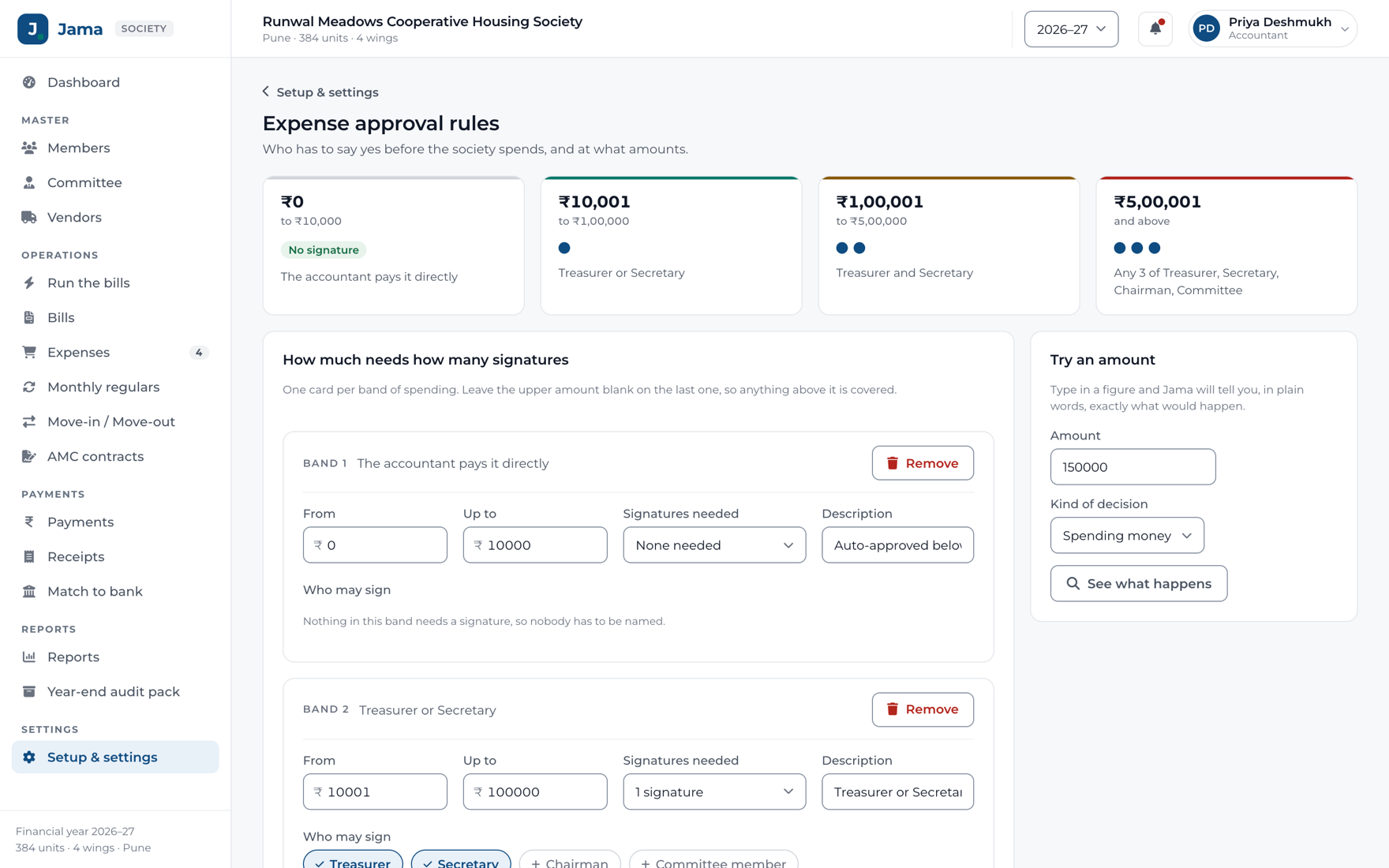
Expense approval bands in Jama, set by amount with the roles allowed to sign

Approval rules by amount

Say what can be spent without a signature, what needs one, and what needs the full committee.

  • Bands by amount, with nought to three signatures each
  • Name the roles allowed to sign in each band
  • The rule an expense was raised under stays with it
  • Changing the bands never rewrites history

The committee’s phone

An app for the people who only need to say yes.

It installs from the browser, with no store to visit. A mobile number and a four digit PIN from the office are all it takes. And it is live: what the office does appears on the phone the moment it happens.

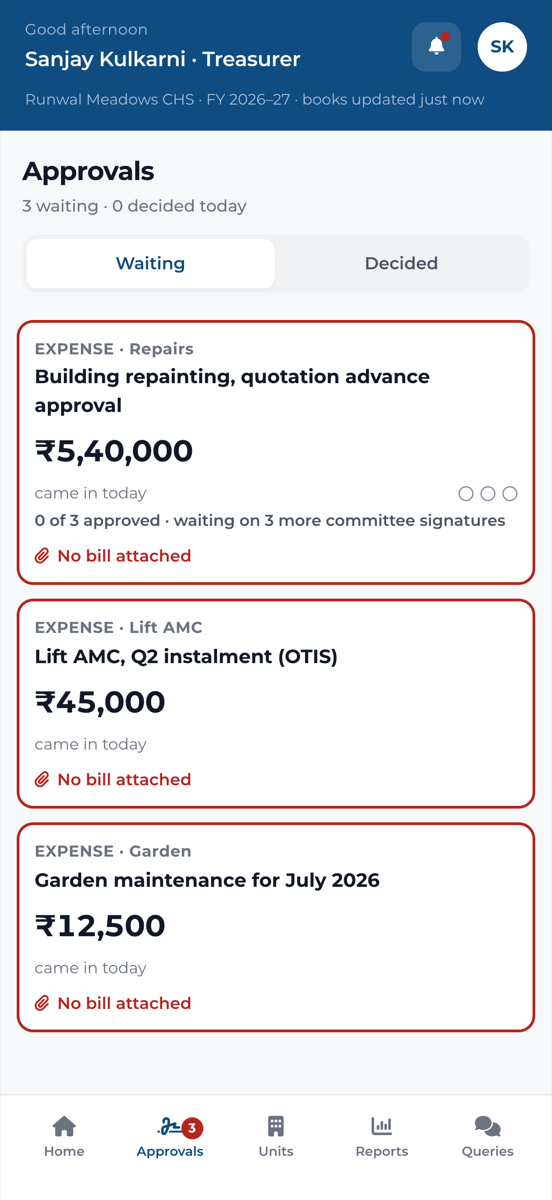
The Jama committee app home screen

What is waiting for you

Live

The moment they open it, a committee member sees what needs their signature, and how long it has waited.

  • An expense raised in the office appears on the phone in seconds
  • “1 of 2 approved · waiting on Secretary”, so nobody chases the wrong person
  • Anything that came without a bill is marked in red
  • Where the society’s money stands, in four figures
Approving an expense from the Jama committee app

Approve, reject or ask

Everything about the expense on one sheet, then one tap.

  • Approve in a tap, and the office sees it at once
  • A rejection cannot be sent without saying why
  • A query goes to the office, and the answer comes back to the phone
  • Who may sign follows the society’s own approval rules
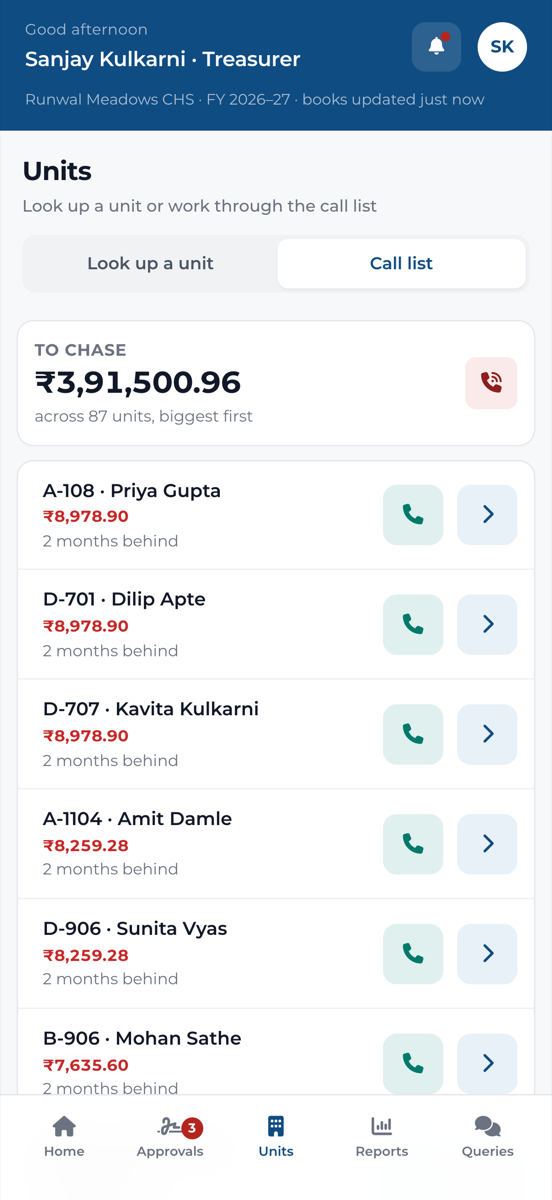
Looking a unit up in the Jama committee app

Any unit, in the lift

When somebody stops a committee member at the gate, the answer is in their pocket.

  • Every unit that owes, biggest first, and for how long
  • Who lives there, their bills and payments
  • The unit’s ledger, the same figure the office sees
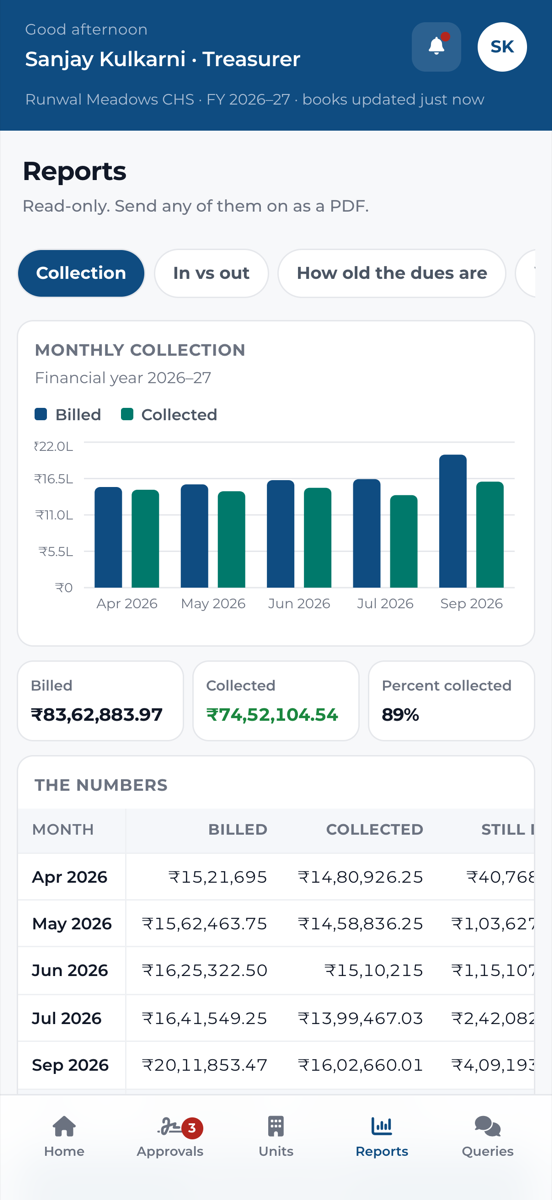
Reports in the Jama committee app

Reports in a pocket

Collection, money in and out, how old the dues are, who owes, and spending.

  • A chart and the figures behind it
  • Send any report on as a PDF from the phone
  • Opens without signal, showing the last figures it saw

The year end

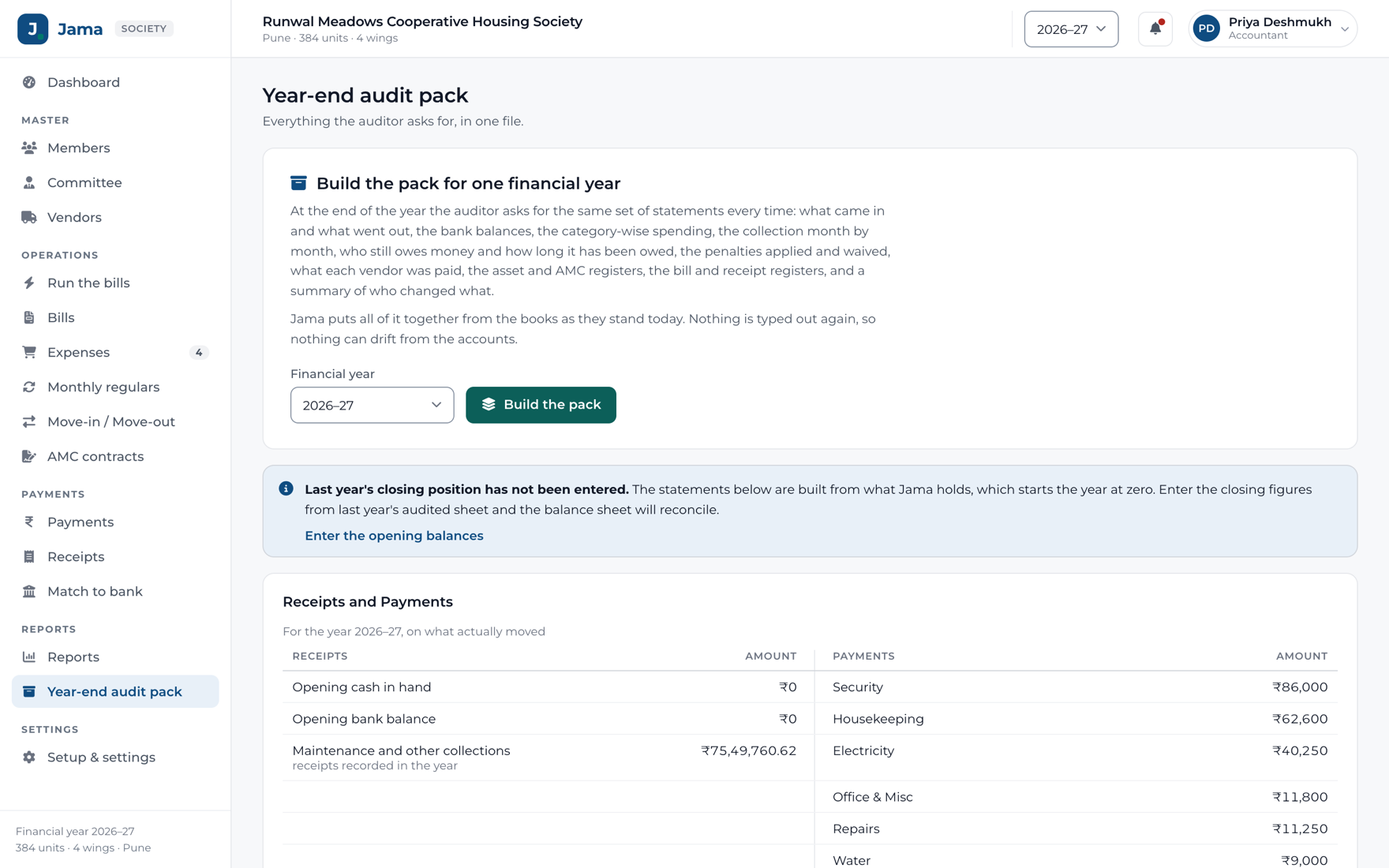
The pack your auditor asks for, already built.

A balance sheet always balances when the general fund is whatever makes it balance. So Jama works the fund out a second way and tells you when the two disagree. That gap is what an auditor finds. Cheaper to find it yourself.

The Jama year-end audit pack with the three statements an auditor asks for

The audit pack

Receipts and Payments, Income and Expenditure, and the Balance Sheet, with the schedules behind every figure.

  • Both sides of each statement agree, or you are told plainly
  • Twelve schedules, each opening to the entries behind it
  • The bill register and the receipt register for the year
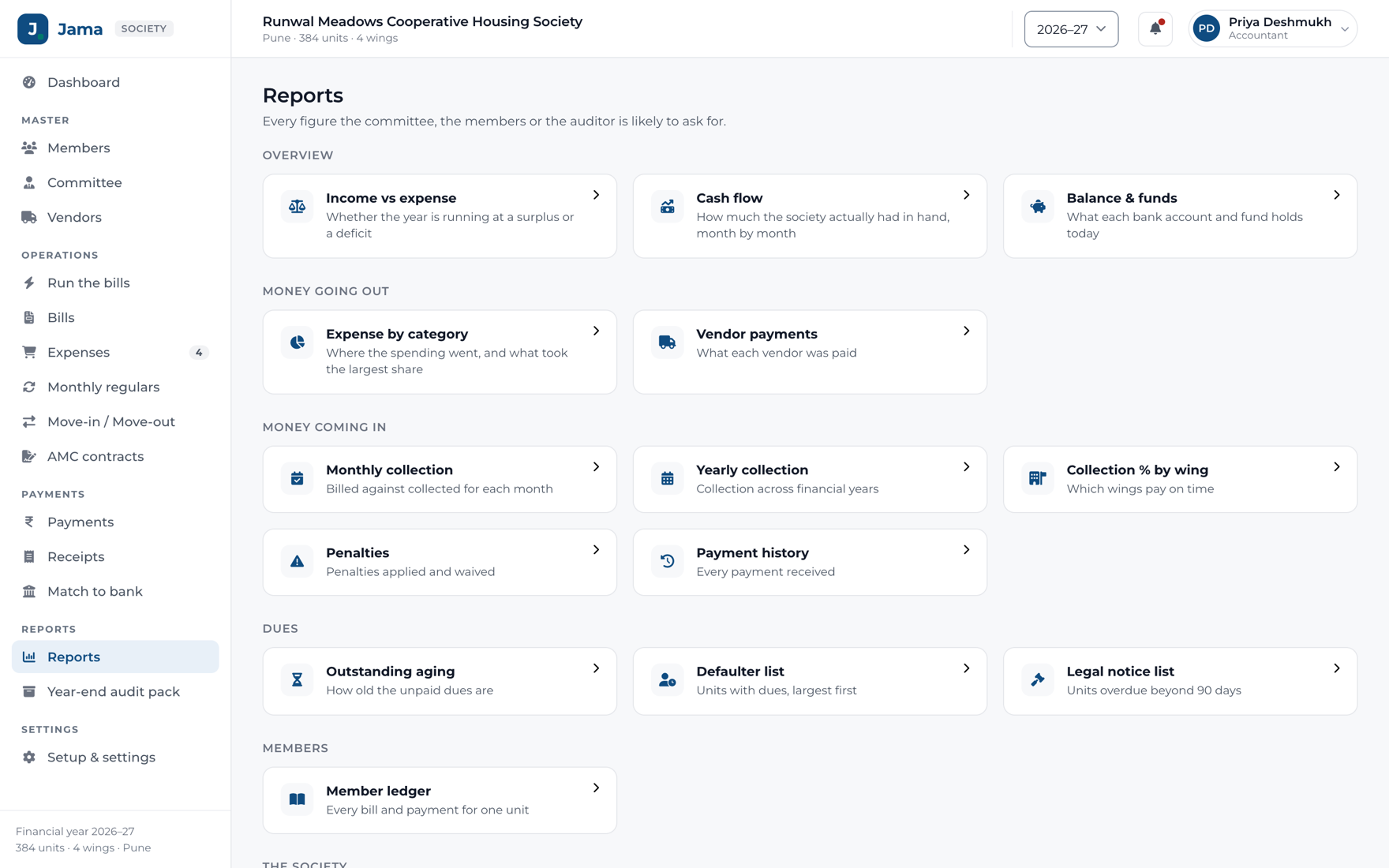
The reports Jama produces for the committee and the auditor

Nineteen reports

Every question a committee meeting asks, answered before it is asked.

  • Income against expenditure, cash flow, collection by wing, ageing
  • Member ledgers, penalties, vendor payments, the defaulter list
  • Any of them as PDF, CSV or Excel

Set up your way

Your society’s rules, not ours.

Fourteen settings screens. Every one of them changes how Jama behaves, not just how it looks.

And the rest

Everything else it does

Smaller things, each one there because a society asked for it.

Charges, the way your society sets them

Five ways to work out what a unit pays, mixed in one bill, bundled into the maintenance structure the general body approved.

Paying, for your members

Every bill carries a link. A member opens it on their phone, sees what they owe and pays the society directly.

Expenses, and who signed them

Every expense shows its bill, its signatures and the questions the committee asked, in one place.

Vendors and contracts

Who the society pays, what was agreed, and what is about to run out.

Questions and answers

A query is a conversation with the office, kept with the expense it is about.

The activity log

Who changed what, and when. Every figure that moved has a name against it.

Members and units

Wings, floors and unit types, and who lives in each, owner or tenant.

Roles and permissions

Define a role of your own and tick exactly what it may do, module by module.

Emails to members

Every email the society sends, in its own words, with one signature under all of them.

Move-in and move-out

A flat changing hands, from the application to the new member on the books.

Installs like an app

The committee’s app adds itself to the home screen from the browser. No store.

Works without signal

Opens offline and shows the last figures it saw, until the network comes back.

Live everywhere

What the office does appears on the committee’s phones the moment it happens, and back.

A tour on day one

A committee member is shown round the app the first time they sign in.

English and Marathi

Receipts in both, Indian digit grouping, and dates the way they are written here.

Exports

Any report as PDF, CSV or Excel, in whatever form the person asking wants it.

Your data stays yours

Every record exports whenever you want, and a full export on request.

Help from inside

Raise a question from any screen and it reaches us with where you were.

Simple pricing

₹10 a flat, a month. The same for every society.

No plans to choose between and no per-user charge. Your committee changes every year and you shouldn’t be billed for that. Forty flats or a thousand, every feature is included.

flats
120 flats × ₹10
₹1,200
GST at 18%
₹216
A month
₹1,416
  1. 1

    A month free

    From the day you sign up, with every feature on. Run a real month on it before you pay anything.

  2. 2

    Invoiced on the 1st

    One invoice a month for the flats you have that day, at ₹10 each, plus GST.

  3. 3

    Due by the 5th

    Pay by UPI or bank transfer. If it runs late, Jama stays open to look at but nothing can be changed until it is paid.

Prices exclude GST at 18%. A new wing is billed from the month after it is added.

Questions

What people ask us before they start

What is Jama?

Jama is software that runs the administration and accounts of an Indian co-operative housing society. It raises the monthly maintenance bill for every unit, records what members pay, matches those payments against the society’s bank statement, tracks what the society spends, routes that spending to the right people for approval, and produces the reports the committee and the auditor ask for.

Who actually uses Jama?

The society’s appointed accountant and its managing committee, meaning the Chairman, Secretary, Treasurer and members. Residents aren’t users at all. A member gets their bill by email and pays by UPI or bank transfer without signing in to anything.

How much does Jama cost?

₹10 a flat a month, plus GST, the same for every society whatever its size. A society of 120 flats pays ₹1,200 a month. The first month is free with every feature switched on and no card needed. After that an invoice is raised on the 1st of each month and is due by the 5th.

Does Jama produce the audit pack our auditor needs?

Yes. Receipts and Payments, Income and Expenditure and the Balance Sheet, with twelve supporting schedules, the bill register and the receipt register. Jama also works the general fund out a second way and tells you when the two figures disagree, which is the gap an auditor would otherwise find for you.

Can Jama read our bank statement?

Upload the PDF you download from net banking, even a password-protected one, and Jama matches each credit against the member and the bill it belongs to, saying how sure it is. Anything it can’t place is left for the office to match by hand or leave out, and nothing reaches the books until somebody confirms the batch.

What if a member says they have paid but the money is not in the bank?

Both facts are shown, and neither is pretended away. The member’s claim sits against the bill as “paid, not verified” until the bank statement settles it. A claim on its own never marks a bill paid.

Does Jama work in Marathi?

Receipts can be issued bilingually in English and Marathi. Amounts use Indian digit grouping and the rupee sign, dates read 27 Jul 2026, and the financial year runs on your society’s own calendar, written 2026–27.

Do committee members need to know accounting to use Jama?

No. The people running a society are volunteers, so nothing in Jama uses accounting jargon. A committee member approves spending from a phone in two taps and never sees a ledger.

How do we get our existing society data into Jama?

Download the members template, fill it in and upload it. Jama reads your headings, shows you what it made of them, and checks every row before anything is saved. Opening balances for the year go in on one screen. On the Society plan and above we do it with you.

What happens if we pay Jama late?

Nothing is lost and nobody is locked out. If the month’s invoice is not paid by the 5th, everyone can still sign in and see everything, but nothing can be changed until it is paid. As soon as the payment reaches us, Jama is fully open again.

What happens to our data if we stop using Jama?

It’s yours. Every report exports to PDF, CSV or Excel whenever you want, and we’ll hand over a full export of your society’s records on request.

Request a demo

See it with your own society’s numbers

Tell us who to call. We will show your committee Jama on a call or at your society office, with a month of your own bills, in about half an hour.

  • A call back within one working day
  • Thirty minutes, at a time that suits the committee
  • No card, no commitment: a thirty-day trial if you want one after

Rather talk now?

Or start the thirty-day trial and set it up yourself.

We use these details only to call you about Jama. We do not share them.